
What can't you do with a parallel port?
Date:
[4th Jun 2026]
I want to make a multiple function parallel port device with a Teensy microcontroller.
Why on earth would I want to do that?
The Story So Far
Back in the early days of home computers, the only ports you'd have would be serial and parallel ports. Desktop computers were able to work around this issue by having expansion slots, but laptops wouldn't really get those until the pcmcia slot. Up until that point, the only means of expansion you'd be likely to have were those serial and parallel ports.
I've been doing some work on my Zeos Notebook 386. It's not a bad little laptop, but I've run into a situation where it's a bit tricky to get data on and off of it. Thankfully, the floppy drive still works, but I've given it a whole 8GB compact flash card for it's boot drive, and I can't mount that on a regular computer to put data on it, because I had to use OnTrack to get it to be recognized by the BIOS circa 1991.
This leaves me with the parallel port and the serial ports to get data onto and off of the laptop. One of those serial ports is actually on a card edge connector, and I have been working on a replacement for the 2400 baud modem that was in that slot but that's only really going to be workable up to about 9600 baud, or 19200 if I'm able to do some coaxing.
Back in the 90's, we solved this problem with the parallel port. Specifically, there are two common devices that folks might recognize that would allow you to store data using a parallel port: The Backpack CD-ROM, and the Iomega Zip Drive.
A couple of weeks ago, I ran across an article on Hackaday, where someone was writing an hardware emulator for the parallel port zip drive. It's definitely the kind of project that I was planning on watching closely, until I got to the end of his blog post, where he mentions the speed limitations with his current microcontroller, and his desire to try again with a Teensy.
I have a Teensy.
Thats where this whole deep dive began.
The Idea
So, at this point, the goal was a device that would emulate a zip drive, maybe emulate a cdrom drive, and we'd have it use the Iomega zip and backpack cdrom protocols respectively, if for no other reason, it'd mean I wouldn't have to write any drivers.
While looking into the drivers from the Linux kernel for these devices, it became readily apparent that I might need to worry about parallel port types.
IEEE 1284
The IEEE 1284 standard defines how modern (cough) parallel ports should operate. Unfortunately, it also specifies 5 different types of parallel port modes that someone may need to deal with:
- Compatibility
- Nibble
- Byte (Bi-directional Parallel Port)
- Enhanced Parallel Port (EPP)
- Extended Capability Port (ECP)
Thankfully, every serial port is supposed to default into Compatibility mode on startup, and only switches modes when you do a handshaking process to negotiate a higher function mode, so that's a really good first target.
Additionally, the Nibble and Byte modes are kind of just some extra bits tacked onto compatibility mode. Nibble uses 4 of the status lines that go to the printer in order to communicate back 4-bits at a time, while Byte depends on the data pins being able to be driven by either the computer or the device in order to send data both ways. So, that establishes that Bi-directional really should be the minimum I'm shooting for.
That being said, both the Backpack and the Zip drives have pass through ports on them for connecting both the drive and your printer at the same time...
Printers
- Fake Parallel Printer
Multiple Different Sound Cards
- Covox Speech Thing
- Disney SoundSource
- OPL2LPT & OPL3LPT
- CMSLPT
- Digispeech Plus
Teensy Audio Board
Reserving Some Pins
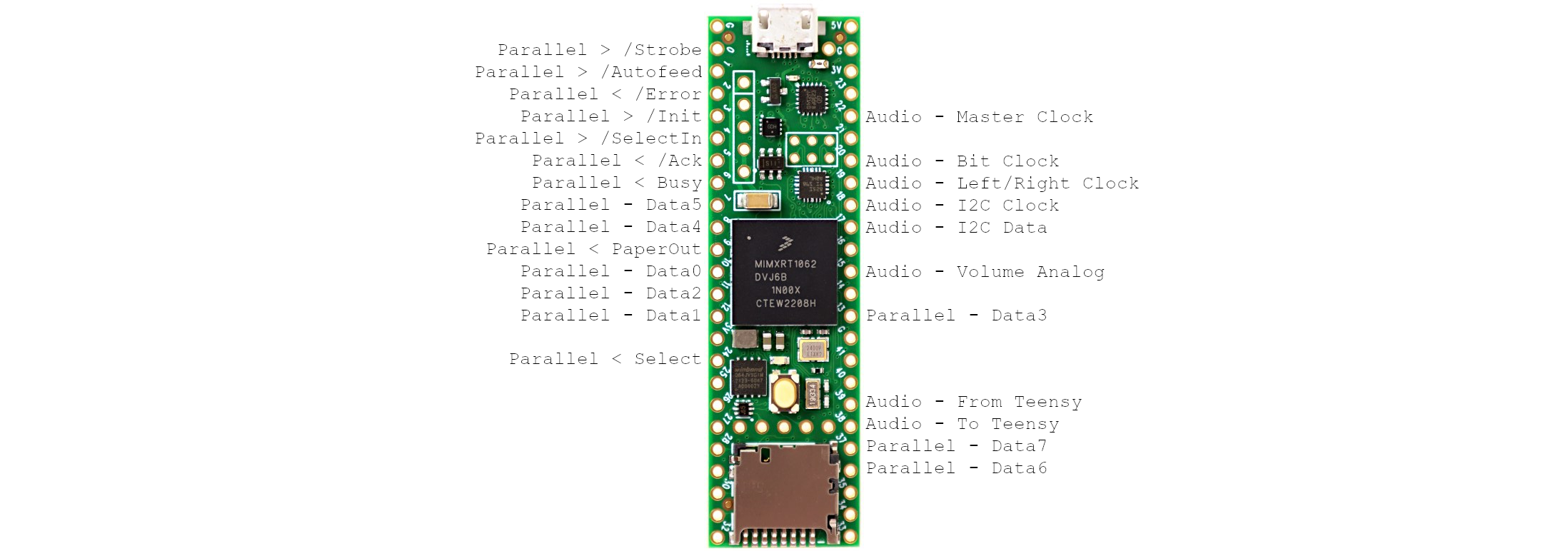
Placeholder: laying out the pins in order to make sure that things are where they're needed.
Ethernet
- Xircom PE3-10BT
USB
At this point, I kinda just decided that it'd probably be best to go ahead and hook up all of the hardware that I can to the Teensy, just so I have the option of using it later on. Since Teensy has a USB host header, and a library that handles tons of devices, it feels like a couple of extra traces and a port is a no-brainer.


